Deep Dive: How to Recover Your Lost Underwater Adventures

Coco Lin
Written byCoco LinUpdated on May 07, 2026

Gerhard Chou
Approved byGerhard Chou

Table of Contents

Before we start: After data loss happened to a underwater motion camera, stop using it or doing any changes to it immediately. Then use a trusted data recovery tool, like Donemax Data Recovery to get back the lost data. If the files were damaged instead, you may also need to find some repair methods to fix the files.

PAGE CONTENT:

We've all been there. You just spent a week diving in the crystal-clear waters of the Maldives or snorkeling the Great Barrier Reef. You get back to your hotel, eager to relive the magic on your laptop, only to see the dreaded message: "SD Card Error" or, even worse, a completely empty folder.

Whether it's a GoPro, DJI Osmo Action, or an Insta360, losing underwater footage feels like losing a piece of the trip itself. But before you panic and start looking for your next flight back to "re-shoot" everything, take a deep breath. In the digital world, "deleted" doesn't always mean "gone."
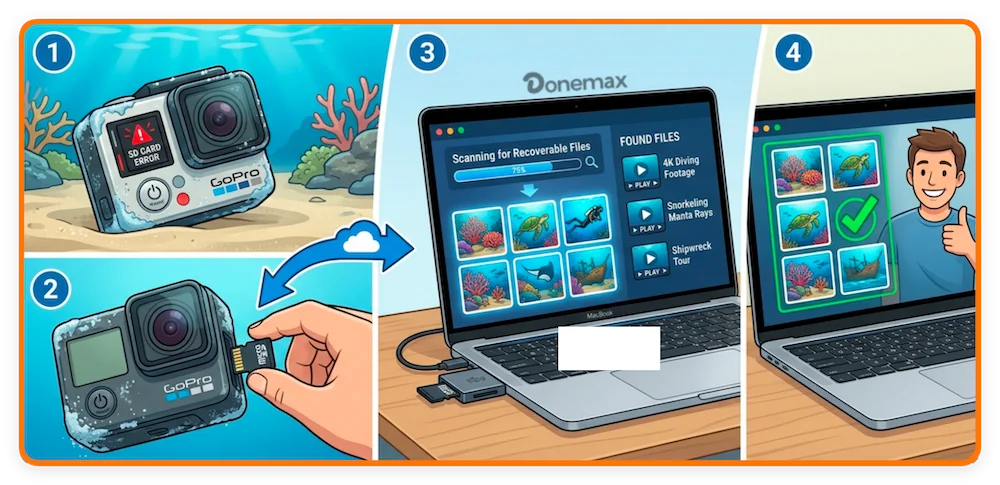
recover photos and videos from underwater camera

In this guide, we'll walk through the professional underwater camera recovery steps to rescue your sunken data and get those high-definition memories back where they belong.

Why Do Underwater Cameras Lose Data?

Understanding the "why" helps you prevent it next time. Motion cameras face unique challenges that standard dSLRs don't:

  • Saltwater Corrosion: Even a tiny leak in your waterproof housing can cause the SD card to short-circuit.
  • Abrupt Power Off: If your battery dies while recording a 4K 60fps video, the file "header" often fails to write, leaving the video corrupted.
  • High-Speed Pressure: Deep-sea diving puts physical pressure on the camera chassis, which can sometimes cause the SD card to shift in its slot during a write cycle.
  • Formatting Mishaps: Accidentally hitting "Format All" instead of "Delete Last" is a classic home-user error.

Steps to Recover Lost Motion Camera Data

Step 1: The "Golden Rule" of Data Recovery

The moment you realize files are missing: STOP USING THE CAMERA.

When you delete a file, the camera doesn't actually erase the data; it just marks the space as "available" for new info. if you keep shooting, the camera will overwrite your lost reef footage with new data, making recovery impossible. Pull the SD card out immediately and put it in a dry, safe place.

Step 2: Check the Hardware (The "Easy" Fixes)

Sometimes the data isn't lost; it's just shy. Before using heavy-duty software, try these:

  • Try a different Card Reader: USB hubs and cheap readers often fail. Plug your SD card directly into a dedicated reader.
  • The "Lock" Switch: Ensure the tiny plastic slider on the side of your SD adapter isn't in the "Lock" position.
  • Clean the Contacts: Use a Q-tip with a tiny drop of isopropyl alcohol to clean the gold pins on the back of the SD card. Salt air can create a thin film of oxidation that blocks the connection.

Step 3: Using Professional Recovery Software

If the hardware is fine but the files are missing, it's time to use a dedicated recovery tool. For home users, you want something that handles "Fragmented" video—a common trait of high-resolution motion cameras.

Donemax Data Recovery is a professional and reliable tool that can handle the case. With the software, it's easy and safe to retrieve lost pictures and videos from underwater motion cameras.

Donemax Data Recovery

  • Recover lost motion camera videos and photos.
  • Support data recovery for SD card, USB drives, HDD/SSD, etc.
  • Fully compatible with latest Windows and macOS systems.

The Recovery Process:

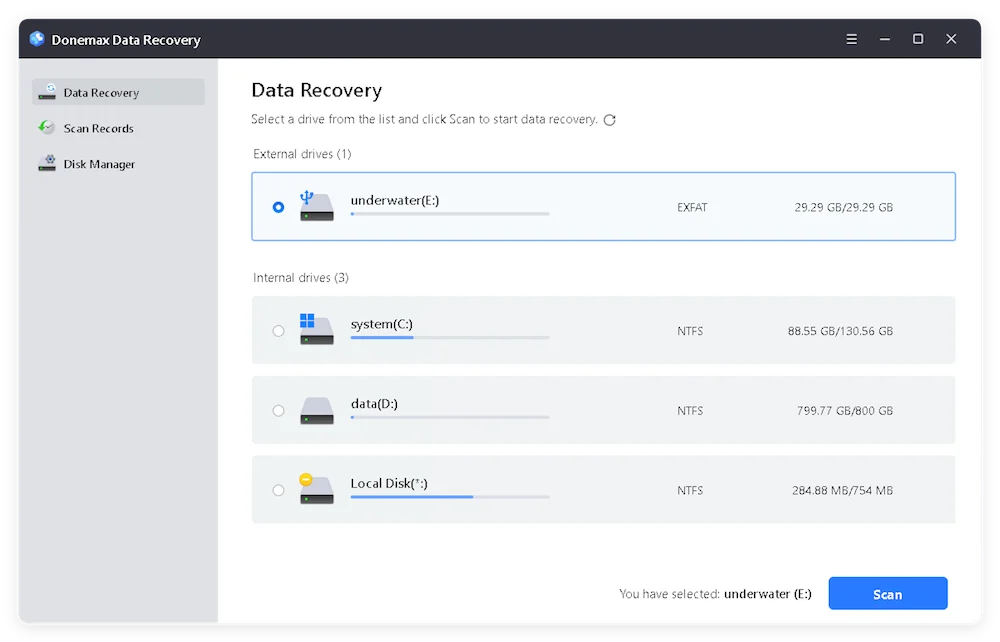
  1. Connect: Plug your SD card into your PC or Mac with a card reader. Open Donemax Data Recovery software and select the SD card.

    recover photos and videos from underwater camera

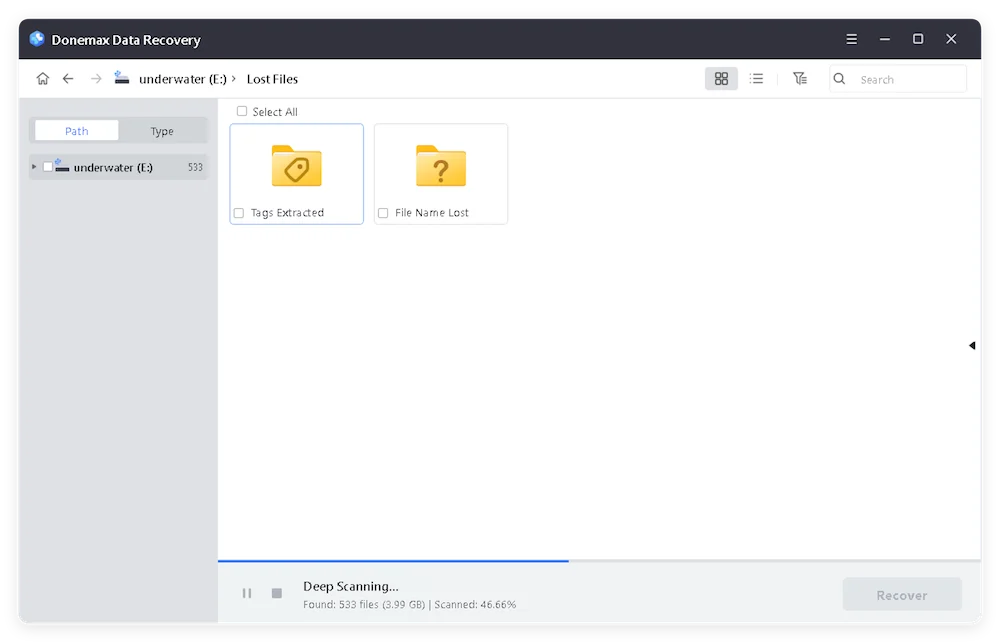
  2. Scan: Click the Scan button to search for missing files from the SD card. The software will use "Deep Scan" mode automatically.

    recover photos and videos from underwater camera

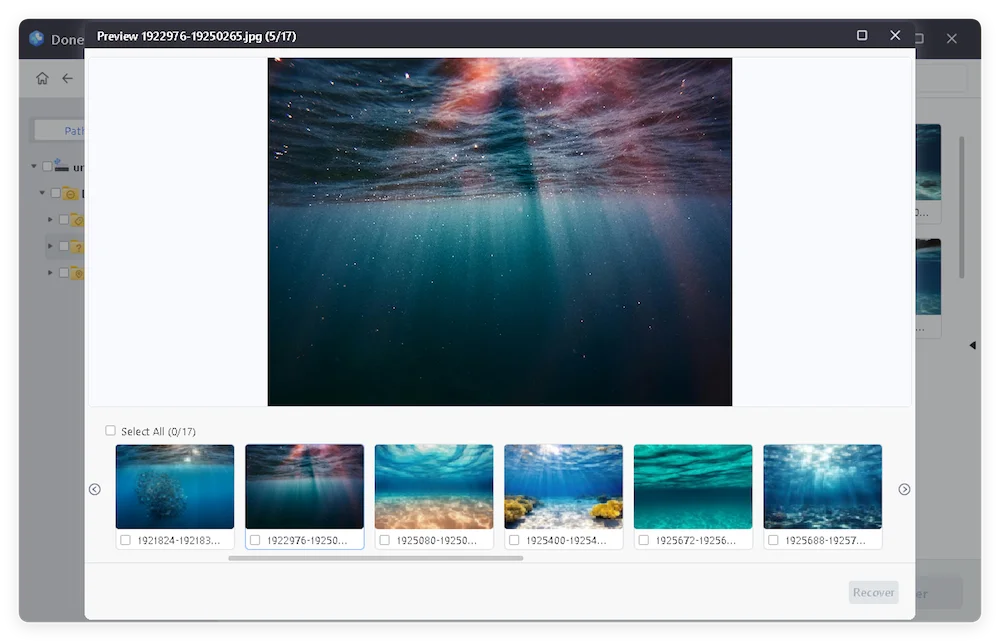
  3. Preview: Most professional tools allow you to see a thumbnail of the lost photos or a snippet of the video before you pay for the full recovery.

    recover photos and videos from underwater camera

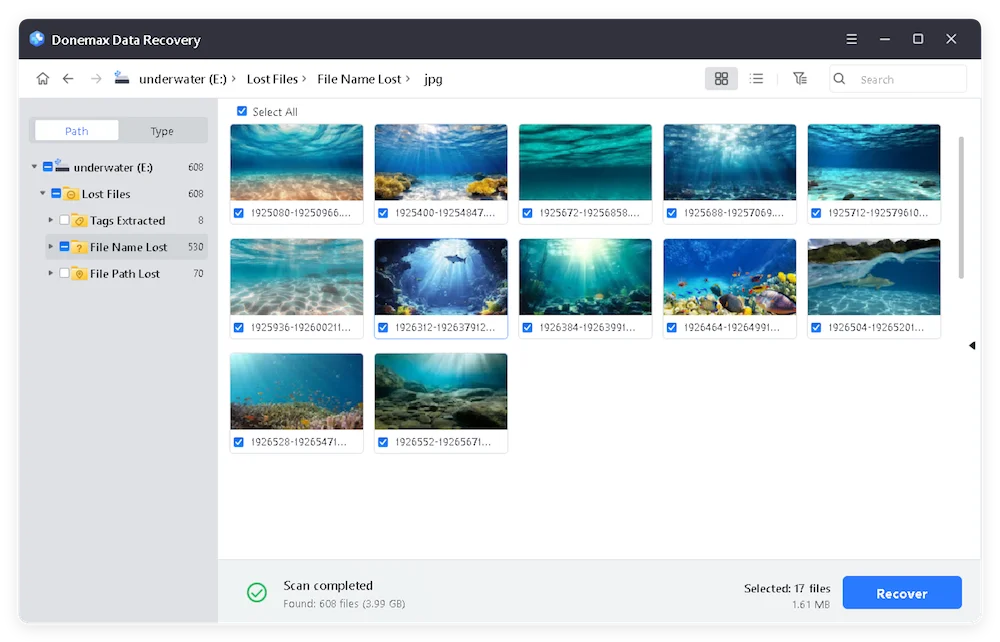
  4. Save (Crucial!): Never save the recovered files back onto the same SD card. Save them to your computer's hard drive first to avoid data overlapping.

    recover photos and videos from underwater camera

Advanced Tip: Repairing "Unplayable" Videos

Sometimes the file is there, but it won't open. This usually happens because the video "atom" or metadata was never closed properly (due to a crash or battery pull).

You can often fix corrupted underwater video using a Video Repair Tool. These programs take a "reference file" (a working video shot on the same camera with the same settings) and use its structure to rebuild the broken file.

Best Practices for Underwater Shooters

  • Format in Camera: Always format your SD card using the camera's internal menu, not your computer. This ensures the file system matches the camera's requirements exactly.
  • The 80% Rule: Don't fill your card to 100%. Leave some "breathing room" for the camera's processor to manage file headers.
  • Fresh Batteries for Big Dives: If you're going below 20 meters, ensure you have a full battery. Pressure and cold temperatures can cause sudden voltage drops, leading to file corruption.

FAQs about Underwater Camera Data Recovery

Yes, but you must act fast. If the SD card itself got wet, rinse it gently in distilled water to remove salt, dry it thoroughly for 48 hours (do not use a hairdryer!), and then try to read it. If it's physically fried, you may need a professional lab.
Not necessarily. "SD ERR" often means the file system is corrupted, but the raw data is still on the flash chips. Recovery software can usually bypass the error and pull the files directly.
Usually, a "Factory Reset" only changes the settings (WiFi, Resolution, etc.) and does not wipe the SD card. However, a "Format" command will wipe the card.
For a 64GB card, a deep scan usually takes 30 to 60 minutes depending on your card's read speed.
Some are, but be careful. Many free tools have limits (like only recovering 500MB) or struggle with the complex "fragmented" files produced by 4K action cameras. For precious memories, a professional-grade tool is usually worth the investment.

Final Thoughts

Losing your underwater footage is a stomach-turning experience, but in 90% of cases, the data is still there waiting to be found. By stopping use immediately and using the right recovery tools, you can get back to sharing your adventures with the world.

Ready to get your photos back? Download our recommended recovery tool below and start your free scan!

logo stage

Donemax Data Recovery

Powerful, safe & easy-to-use data recovery software. Easily and completely recover deleted, formatted, or other lost data. The tool supports PC, Mac, HDD, SSD, USB drive, camera, SD card, RAID and other storage devices.

Coco Lin
Contributing Writer

Coco Lin

Coco has been a writer and a chief programmer at Donemax software since 2018. Over 10 years of experience of writing troubleshooting articles in the software industry, she is passionate about programming and loves to providing solutions to Windows and Mac users. Also she enjoys music and palying tennis in her free time.

Gerhard Chou
Editor in chief

Gerhard Chou

In order to effectively solve the problems for our customers, every article and troubleshooting solution published on our website has been strictly tested and practiced. Our editors love researching and using computers and testing software, and are willing to help computer users with their problems