
Written byStevenUpdated on Mar 05, 2026

Before we start: Accidental deletion may cause important videos loss on actiion camera. Fortunately, the deleted videos could be recovered in most cases. Before the deleted data is overwritten or damaged, you can use Donemax Data Recovery to recover deleted videos from action camera effectively.
PAGE CONTENT:
Losing important footage from your action camera can be frustrating—especially if it captured once-in-a-lifetime moments like a mountain climb, a scuba dive, or a racing event. Whether you use a GoPro, DJI, Insta360, AKASO, or Sony action cam, deleted videos are often recoverable.

In this comprehensive guide, you'll learn why action camera videos get deleted, how recovery works, and the safest methods to restore your footage from an SD card—even after formatting.
Understanding the cause of deletion helps you choose the right recovery method.
1. Accidental Deletion: Action cameras have small screens and limited controls. It's easy to delete the wrong clip while previewing footage.
2. Formatting the SD Card: You may format the card:
Quick formatting does not immediately erase the data—it only removes file references.
3. Corrupted or RAW SD Card: Sudden battery removal, power loss during recording, or improper ejection can corrupt the file system. The card may appear as "RAW" or request formatting.
4. File System Errors: Using the same SD card across multiple devices without proper formatting can cause compatibility issues.
5. Physical Damage: Extreme sports environments expose cards to:
If the memory chip isn't destroyed, recovery may still be possible.
Yes—in most cases. When you delete a video, the camera does not erase the actual data immediately. Instead:
Until new data overwrites that space, recovery software can scan the SD card and rebuild deleted files.
When Recovery Is Possible
💡 Important: Stop using the SD card immediately. Continuing to record reduces recovery chances.
When Recovery Is Not Possible
Unfortunately, recovery fails when:
In cases of physical damage, professional data recovery labs may help—but costs are high.
First Things to Do After Deleting Videos
Quick action dramatically increases recovery success.
This is the most effective method. Professional data recovery software can scan the action camera memory card to find the deleted or lost files effectively.
Why Professional Recovery Software Works
High-quality recovery tools:
Action cameras typically record in:
Advanced recovery tools can reconstruct these formats.
If you deleted important videos from action camera without backups, you can use the software Donemax Data Recovery. It can easily and quickly recover the deleted videos.
Step-by-Step Recovery Process
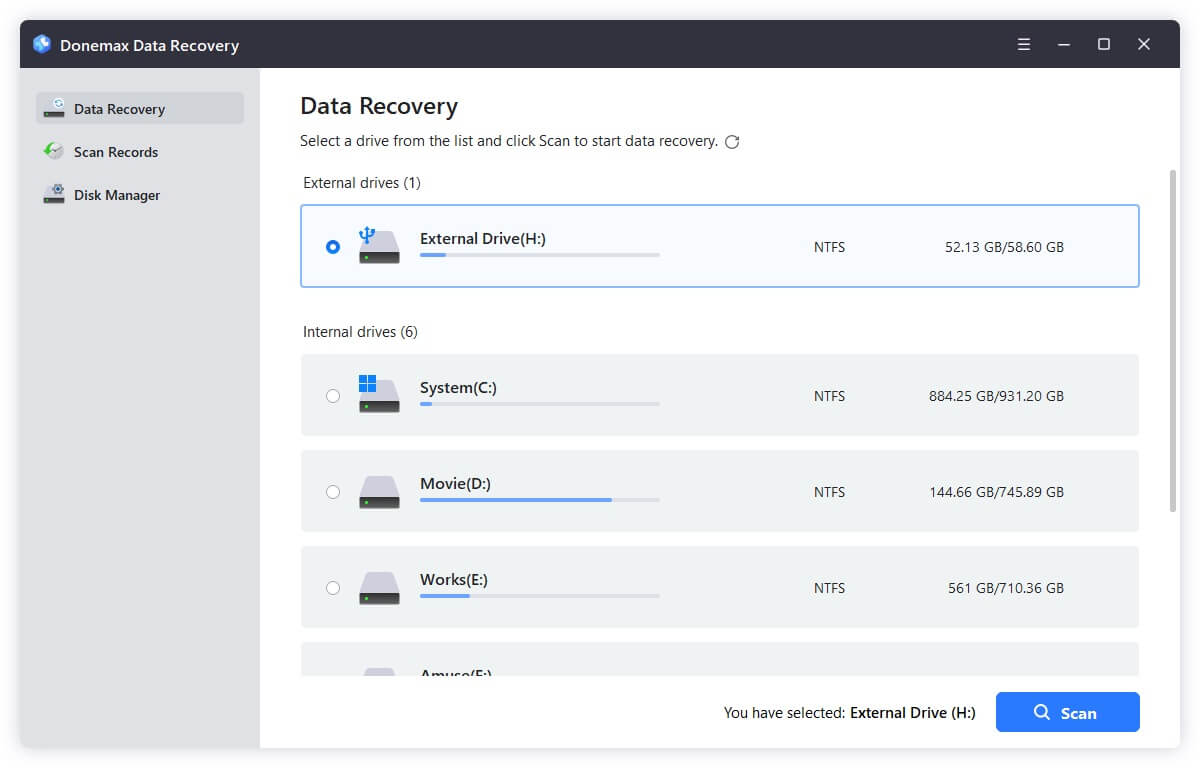
Step 1: Take the microSD card out of your action camera. Use a card reader for stable detection. Run the recovery software on your PC or Mac. Select the SD card.
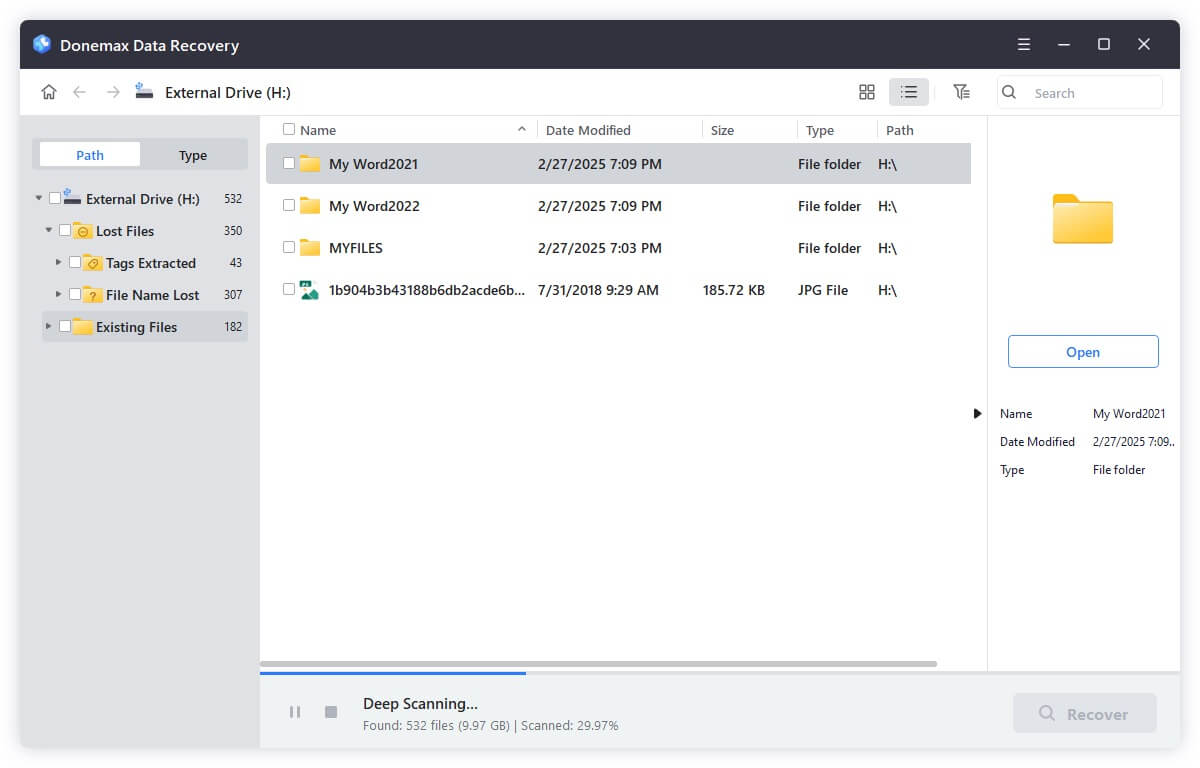
Step 2: Click the Scan button and the software will deeply scan the SD card. This may take 10–60 minutes depending on card size.
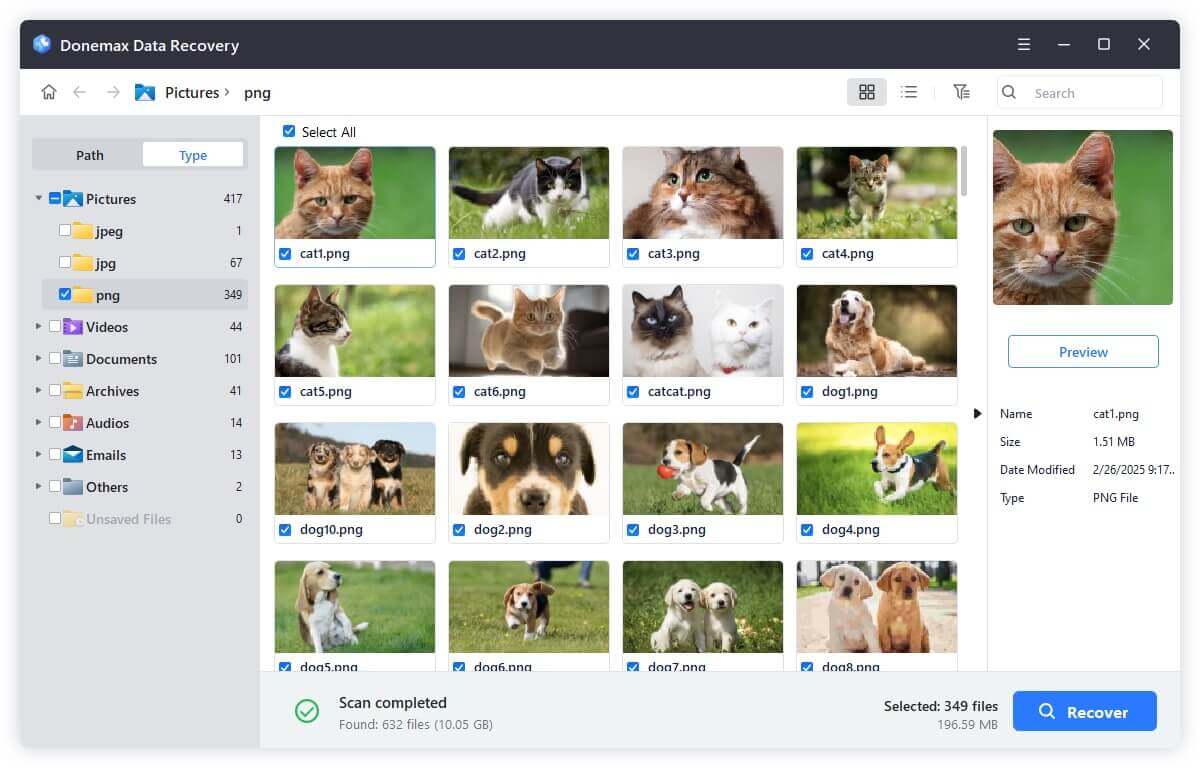
Step 3: The software will show you all the found files after the scan is done. Also, the software allows to preview video thumbnails or clips before recovery. Select the wanted videos and save recovered files to internal hard drive, external drive, or SSD.
💡 Note: Never save recovered videos back to the same SD card.
Tips for Recovering Large 4K Action Camera Files
Action camera videos are often:
To improve recovery:
If a recovered video doesn't play smoothly, it may need repair (covered below).
Sometimes recovery software isn't even necessary.
Cloud Backup
Some cameras sync to apps or cloud services. For example:
Check:
Local Backup
Look for:
Always check before performing recovery.
Technically, yes—but it's not ideal.
You can:
However:
For best results, always use a PC or Mac.
Prevention is always better than recovery. Here are some tips to avoid video loss on action camera in the future:
1. Use High-Quality SD Cards - Choose reputable brands with high write speeds.
2. Format in Camera - Always format the card inside the action camera before important shoots.
3. Safely Eject the Card - Avoid removing the card while recording or transferring files.
4. Keep Multiple Backups - Follow the 3-2-1 backup rule:
5. Enable Cloud Sync - If your camera supports automatic cloud uploads, enable it.
Accidentally deleting action camera footage is stressful—but not hopeless. In most cases, videos are recoverable if you act quickly and avoid overwriting the SD card.
The key steps are simple:
Whether you're using a GoPro on a mountain trail or a DJI action cam during a bike ride, your memories aren't gone forever. With the right approach, you can successfully recover deleted action camera videos and protect your footage in the future.
If you act fast, your adventure footage still has a very high chance of coming back.
Donemax Data Recovery
Powerful, safe & easy-to-use data recovery software. Easily and completely recover deleted, formatted, or other lost data. The tool supports PC, Mac, HDD, SSD, USB drive, camera, SD card, RAID and other storage devices.
Steven
Steven has been a senior writer & editor of Donemax software since 2020. He's a super nerd and can't imagine the life without a computer. Over 6 years of experience of writing technical solutions and software tesing, he is passionate about providing solutions and tips for Windows and Mac users.
Gerhard Chou
In order to effectively solve the problems for our customers, every article and troubleshooting solution published on our website has been strictly tested and practiced. Our editors love researching and using computers and testing software, and are willing to help computer users with their problems