
Written byCoco LinUpdated on Sep 09, 2026

Before we start: Deleting files or emptying the Recycle Bin/Trash on an SSD does not immediately destroy the underlying data. Due to wear-leveling algorithms, deleted file fragments linger in the SSD's free space and remain vulnerable to recovery software. To clear free space on an SSD so data is unrecoverable, you must perform a dedicated free space wipe using specialized software like Donemax Data Eraser.
PAGE CONTENT:
When you delete a document, photo, or financial spreadsheet from your computer and empty the Recycle Bin or Trash, it feels like the data is gone forever. However, on a technical level, your operating system has only removed the index entry pointing to that file. The actual binary bits of your file remain written on the Solid State Drive (SSD) storage chips inside the designated 'Free Space' area until new data overwrites them.
As a result, deleted file remnants can stay hidden in unused blocks for days, weeks, or even months. If you want to protect your privacy, sell your computer, or clean up sensitive work files, learning how to clear free space on SSD so data is unrecoverable is an essential security step.
Many computer users rely on standard file deletion or quick disk formatting, assuming these built-in actions protect their privacy. Unfortunately, neither method provides true data destruction on flash-based storage.
Because of these architecture differences, wiping the unallocated 'free space' across the drive is the only way to ensure previously deleted files are completely destroyed.
If you have researched SSD storage, you have likely heard of the TRIM command. TRIM is an ATA command that enables the operating system to inform the SSD controller which blocks of data are no longer in use.
Once notified, the SSD controller clears those blocks in the background during garbage collection. When TRIM operates normally, deleted files usually become unrecoverable after a short period.
However, relying solely on TRIM for immediate data destruction is risky because TRIM fails under several common conditions:
Because TRIM is inconsistent, taking manual action with certified wiping software is required when you need guaranteed, instantaneous data destruction.
The safest and most reliable way to sanitize deleted files on an SSD without damaging the drive is using certified software like Donemax Data Eraser. Donemax Data Eraser is designed specifically for modern NVMe, SATA SSDs, HDDs, and external drives on both Windows and Mac.
Donemax Data Eraser includes a dedicated 'Erase Free Space' mode. This feature fills all unallocated space with randomized zero-and-one data patterns. It destroys all residual traces of deleted files while leaving your existing operating system, installed applications, and active files completely safe and untouched.
Step 1: Download and Install Donemax Data Eraser
Download Donemax Data Eraser and install it on your Windows PC or Mac. Launch the application to view the main menu dashboard.
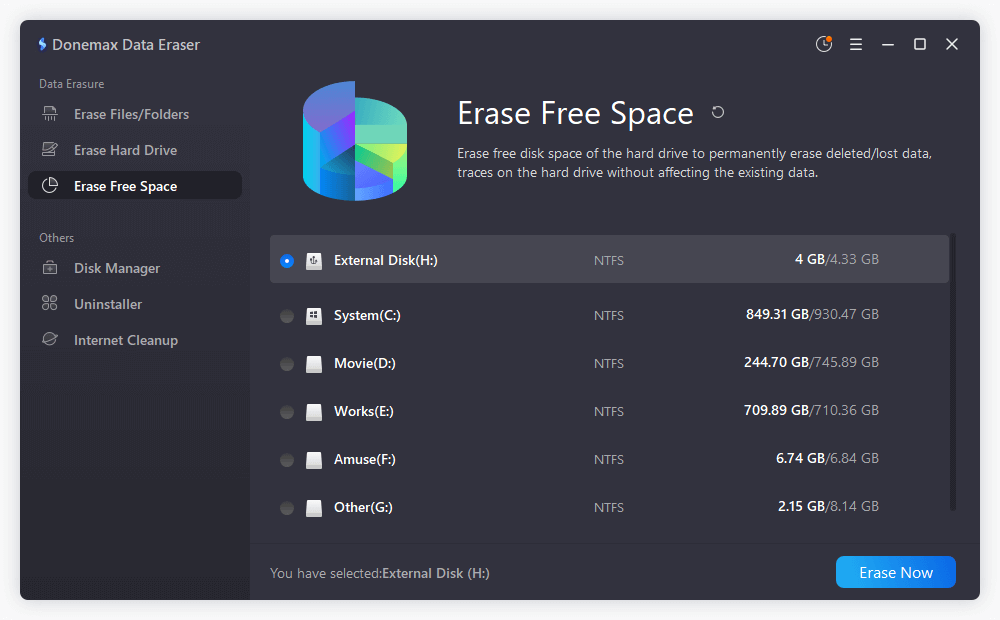
Step 2: Choose 'Erase Free Space' Mode
In the left navigation panel, select the Erase Free Space option. This mode is specifically engineered to target unallocated sectors where deleted file remnants hide.
Step 3: Select Your SSD Drive
Select the SSD volume or partition (such as Local Disk C: or a secondary drive volume) that contains the free space you want to scrub. Donemax Data Eraser will display the total capacity and available free space. Click on the Erase Now button to continue.
Step 4: Pick a Certified Erasure Standard
Click on the algorithm dropdown to choose your data wiping standard. Donemax supports globally recognized protocols:
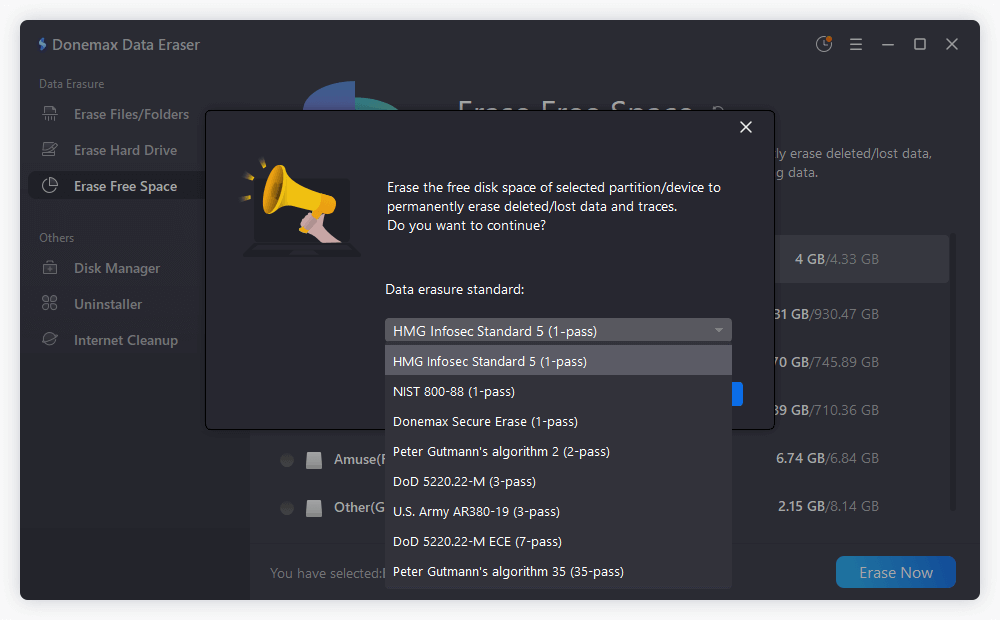
Step 5: Execute the Free Space Wipe
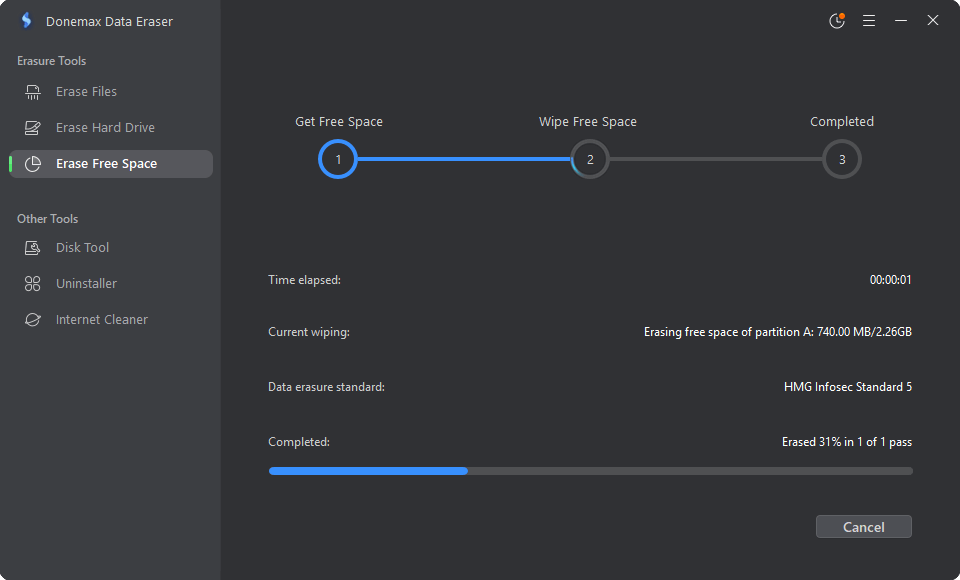
Click the Continue button. Confirm the prompt to start the process. Donemax Data Eraser will systematically overwrite every free memory block across the selected SSD partition. Once completed, all previously deleted files are rendered 100% unrecoverable.
If you prefer using built-in system tools alongside erasing software, you can manually force your operating system to execute the TRIM command across your SSD.
Manually Triggering TRIM on Windows 11/10
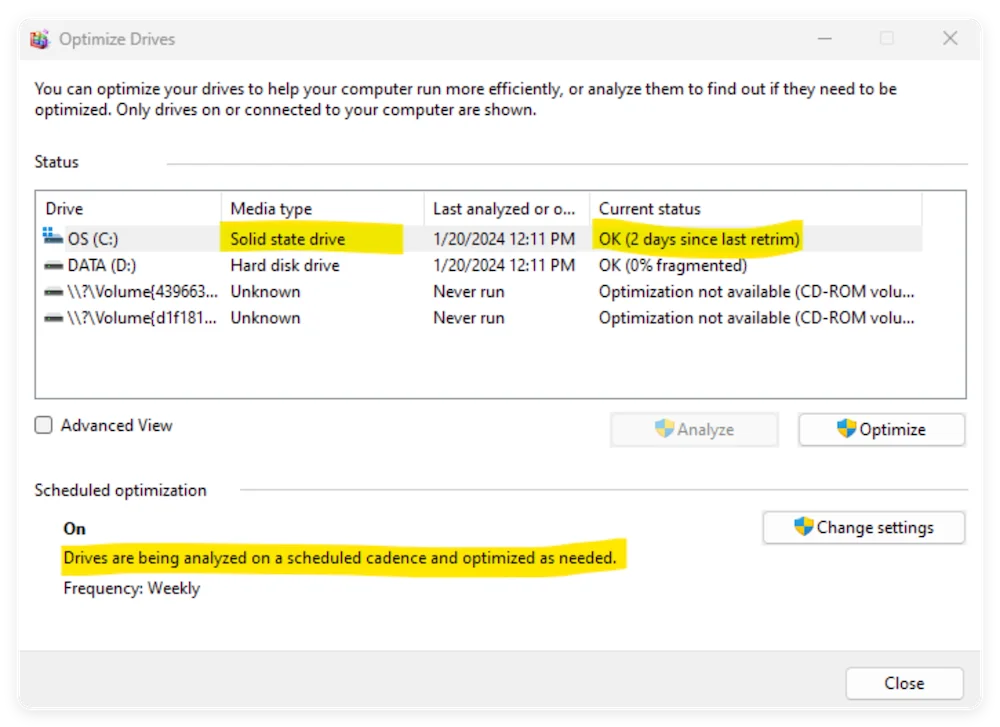
Manually Triggering TRIM on macOS
Protecting your private data requires more than dragging files to the Recycle Bin. On modern SSDs, wear-leveling algorithms and deferred TRIM operations can leave sensitive file traces exposed long after you think they are gone.
By taking control and learning how to clear free space on SSD so data is unrecoverable, you can permanently scrub deleted files without affecting your active system.
Whether you are preparing to sell your laptop, returning a workplace computer, or simply performing routine digital maintenance, Donemax Data Eraser provides a safe, certified, and easy-to-use solution. Download Donemax Data Eraser today and ensure your deleted data stays unrecoverable forever!
Donemax Data Eraser
The best data erasure program to permanently delete data. It works on PCs, Macs, HDDs, SSDs, USB drives, digital cameras, and other devices. Once the tool erases the data, no one can recover it by any method.
Coco Lin
Coco has been a writer and a chief programmer at Donemax software since 2018. Over 10 years of experience of writing troubleshooting articles in the software industry, she is passionate about programming and loves to providing solutions to Windows and Mac users. Also she enjoys music and palying tennis in her free time.
Gerhard Chou
In order to effectively solve the problems for our customers, every article and troubleshooting solution published on our website has been strictly tested and practiced. Our editors love researching and using computers and testing software, and are willing to help computer users with their problems