
Written byStevenUpdated on Oct 14, 2026

Before we start: Performing a standard Windows 11 factory reset is NOT enough to keep your private files safe before selling your computer. To permanently wipe hard drive before selling Windows 11, first perform a factory reset . Second, launch Donemax Data Eraser and run a military-grade wipe. This guarantees that files removed during factory reset cannot be recovered by any means.
PAGE CONTENT:
Selling, donating, or recycling your Windows 11 computer is a great way to upgrade your tech or give your device a second life. However, before you hand your PC or laptop over to a stranger, protecting your digital privacy must be your top priority.
Over years of daily use, your Windows 11 hard drive or SSD builds up thousands of sensitive personal records. These include online banking downloads, tax documents, web browser passwords, personal photos, private emails, and work files.

Most computer owners assume that running the built-in Windows 11 factory reset completely cleans their hard drive. Unfortunately, that is a dangerous misunderstanding. In this guide, we will explain why a factory reset alone falls short and show you the ultimate 2-step method to permanently wipe hard drive before selling Windows 11 using Donemax Data Eraser.
When you choose 'Reset PC' in Windows 11, Microsoft gives you the option to 'Remove everything'. While this sounds thorough, it does not permanently overwrite your underlying binary data.
1. How File Deletion Works in Windows 11
During a standard factory reset, Windows 11 clears file system allocation tables and resets operating system directories to default settings. However, the raw contents of your deleted personal files still remain on the disk sectors, marked as 'free space'.
2. Commercial Data Recovery Software Can Restore 'Reset' Files
Anyone who buys your old computer can download free, publicly available data recovery software. With just a few clicks, these tools can scan the unallocated free space of your drive and resurrect your deleted documents, photos, and browser caches completely intact.
3. Why Overwriting Free Space Is Essential
To guarantee that your deleted files cannot be restored by a buyer or cybercriminal, you must fill those empty storage sectors with random data patterns. Overwriting the free space on your system drive ensures 100% data destruction.
Here is a quick overview comparing standard reset methods against a complete sanitization strategy:
| Preparation Method | Removes Windows Apps & OS? | Overwrites Deleted Files? | Data Recovery Risk |
|---|---|---|---|
| Windows 11 Factory Reset Only | Yes (Resets OS) | No (Index cleared only) | High (Files easily recovered) |
| Format C: Drive in Setup | Yes (Deletes OS) | Partial (Leaves free sectors) | Medium (Partial file recovery) |
| Reset PC + Donemax Free Space Wipe | Yes (Clean OS preserved) | Yes (100% Overwritten) | Zero (100% Unrecoverable) |
Before starting the wiping process, make sure you complete these essential housecleaning tasks:
The first major step is performing a clean factory reset to restore Windows 11 to its out-of-the-box state while removing user profile accounts:
1. Open Windows 11 Recovery Settings
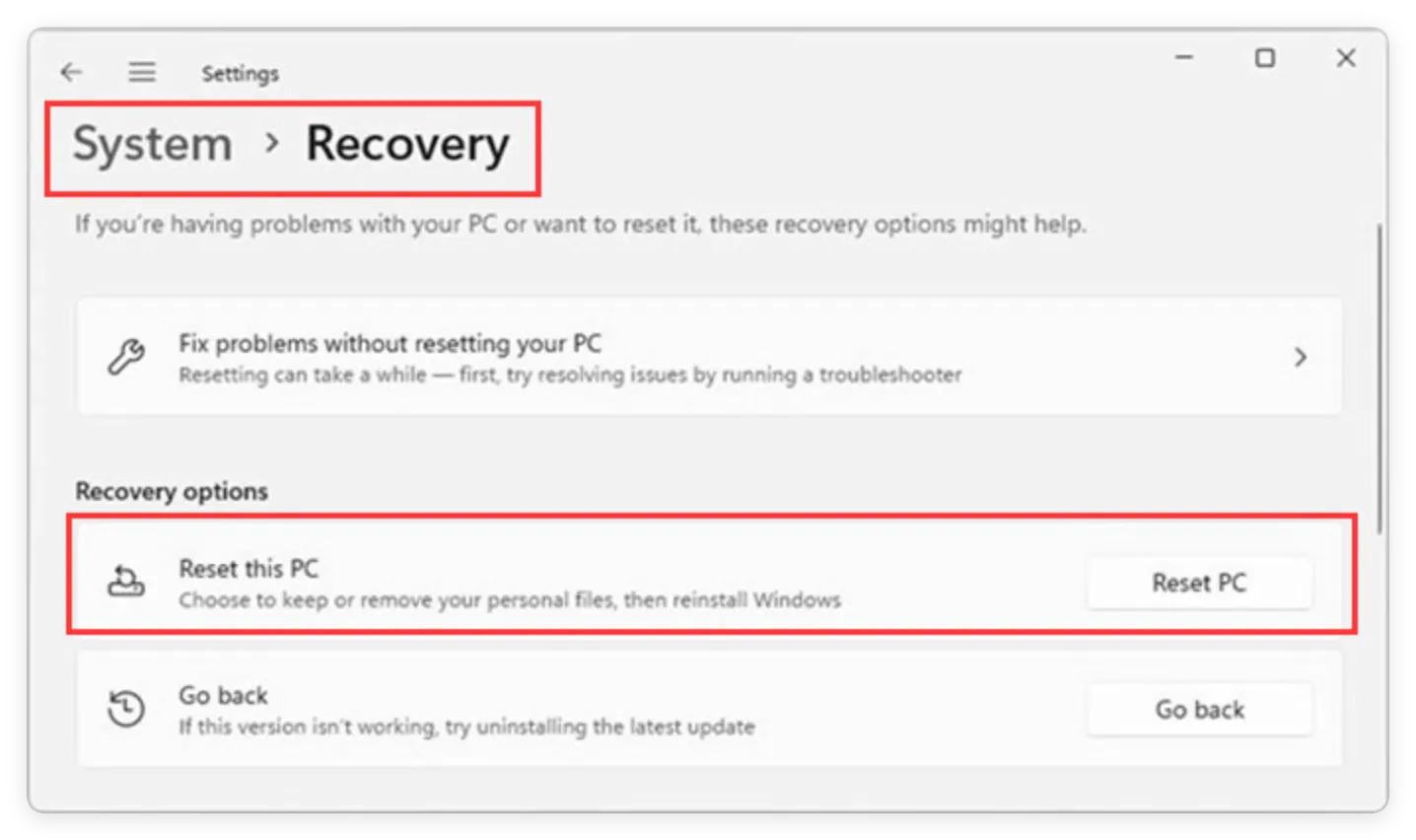
Click on the Start Menu, open 'Settings', navigate to 'System', and select 'Recovery'.
2. Initiate PC Reset
Find the 'Reset this PC' option and click the 'Reset PC' button on the right side.
3. Select 'Remove Everything'
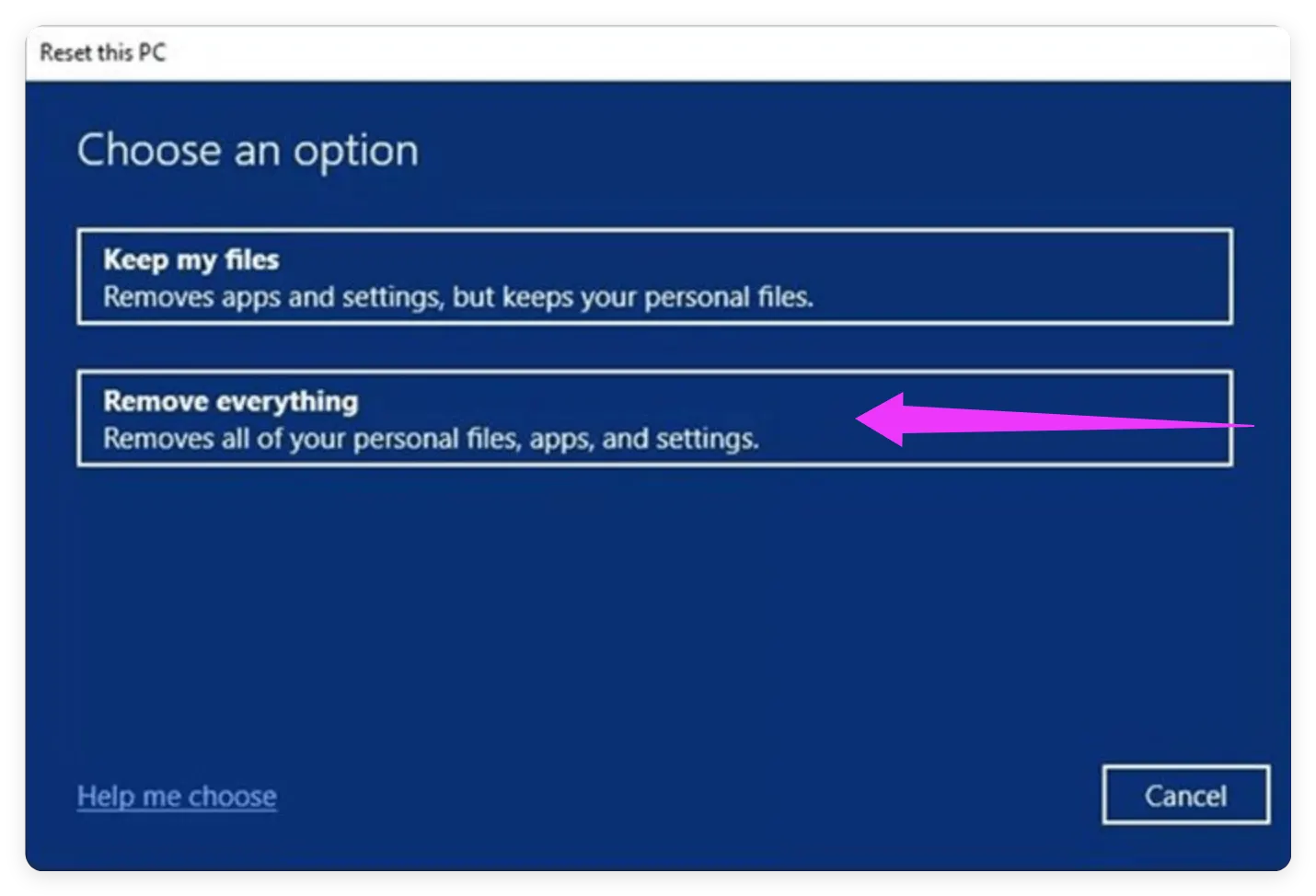
When prompted with reset options, choose 'Remove everything'. This ensures that all your personal files, installed apps, and custom settings are deleted from the system.
4. Configure Reinstallation Options
Choose between 'Local reinstall' (faster) or 'Cloud download'. Under additional settings, confirm that data removal is enabled, and click 'Reset' to begin the process.
Your computer will restart several times while reinstalling a clean copy of Windows 11. Once completed, you will arrive at the initial Windows setup screen.
Now that Windows 11 is cleanly reinstalled, all your deleted personal files are lingering in the drive's free space. To permanently destroy them beyond recovery, use Donemax Data Eraser.
1. Complete Initial Windows 11 Setup
Set up a temporary local user account (e.g., 'User') so you can access the Windows 11 desktop.
2. Download and Launch Donemax Data Eraser
Download and install Donemax Data Eraser on your freshly reset computer.
3. Select Your System Drive (C: Drive)
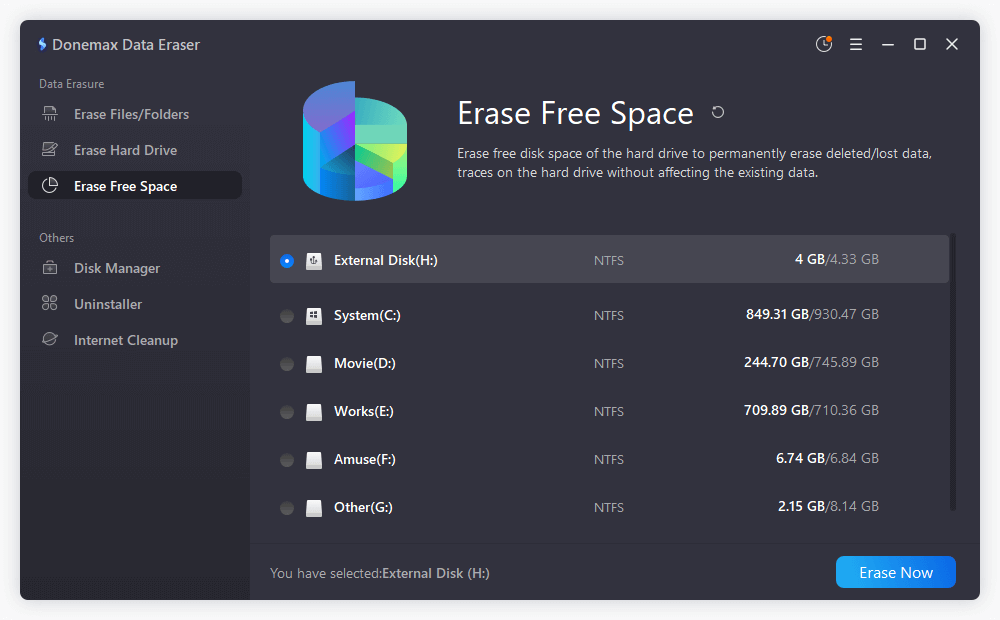
Open the software and navigate to the 'Erase Free Space' mode from the left-hand menu. Choose the drive partition where your browser data and user files were stored prior to the reset. By default, this is your system drive (C: drive).
4. Choose a Data Erasure Standard and Execute Wipe
Click the settings button to select a military-grade data wiping algorithm (such as DoD 5220.22-M 3-pass or U.S. Army 7-pass). Start wiping and confirm by clicking 'Continue'.
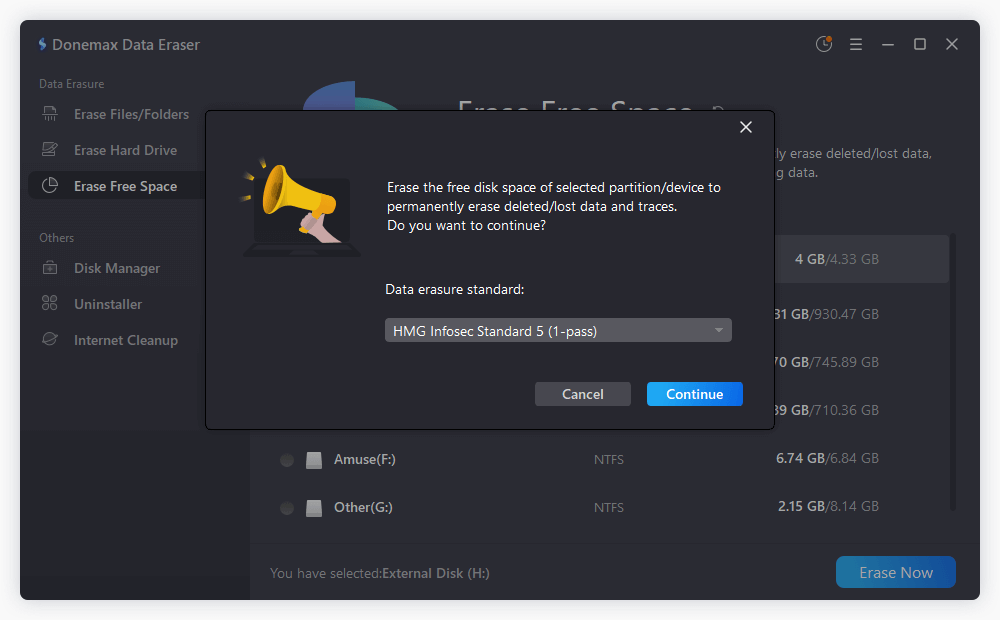
Donemax Data Eraser will systematically write random binary data across all empty disk sectors. This process guarantees that all personal files removed during the factory reset are permanently destroyed and completely unrecoverable.
Donemax Data Eraser utilizes internationally recognized sanitization protocols to guarantee 100% data destruction compliance:
When preparing to sell your Windows 11 computer, taking shortcuts with your privacy can lead to disastrous data leaks. A simple factory reset leaves your personal records vulnerable to basic recovery software.
By following the ultimate 2-step solution—combining a Windows 11 factory reset with Donemax Data Eraser to wipe free space—you guarantee that every deleted file is permanently destroyed.
Protect your identity, financial privacy, and peace of mind today. Download Donemax Data Eraser and sanitize your Windows 11 drive before handing it over to its next owner!
Donemax Data Eraser
Donemax Data Eraser The best data erasure program to permanently delete data. It works on PCs, Macs, HDDs, SSDs, USB drives, digital cameras, and other devices. Once the tool erases the data, no one can recover it by any method.
Steven
Steven has been a senior writer & editor of Donemax software since 2020. He's a super nerd and can't imagine the life without a computer. Over 6 years of experience of writing technical solutions and software tesing, he is passionate about providing solutions and tips for Windows and Mac users.
Gerhard Chou
In order to effectively solve the problems for our customers, every article and troubleshooting solution published on our website has been strictly tested and practiced. Our editors love researching and using computers and testing software, and are willing to help computer users with their problems