
Written byStevenUpdated on Sep 03, 2026

Before we start: Deleting files or formatting an SD card in a camera does not erase the underlying data blocks. It only marks the space as 'available' for future writing. Anyone with standard recovery software can easily retrieve your personal photos. It's necessary to wipe the data permanently with Donemax Data Eraser or other professional tools.
PAGE CONTENT:
Returning a newly purchased digital camera or memory card to a retailer, sending equipment back under warranty, or selling gear on second-hand marketplaces can easily expose your private files if you do not handle data wiping properly. When you press 'Delete' on your camera or format the SD card in your computer, you might assume your personal photos, video recordings, and sensitive EXIF location metadata are gone forever. However, this is a dangerous misconception.
Standard camera formatting and file deletion only remove the pointer index to the files. The actual image and video data remain intact on the flash memory chips. Free data recovery tools readily available on the internet can scan the card and restore your deleted photos within minutes. If you want to protect your privacy completely, you must securely wipe digital camera memory card before return so that the information becomes 100% unrecoverable.
Many photographers mistakenly believe that executing a 'Low-Level Format' inside the camera menu provides total data erasure. While camera-based formatting is essential for preparing cards for fresh shooting, it is strictly an administrative reset.
Camera menu formatting recreates the file allocation system (such as FAT32 or exFAT). It clears the directory structure so the camera shows full capacity. However, it rarely overwrites the raw data sectors with zero bytes or random patterns across the entire storage space. To ensure complete data destruction, you must use professional data sanitization software that overwrites every single sector.
To permanently overwrite and destroy all remaining traces of data on your camera card, using a dedicated, professional data wiping program is necessary. Donemax Data Eraser is a powerful and reliable data wiping utility designed for Windows and Mac users. It employs military-grade data erasure algorithms to overwrite memory sectors, guaranteeing that no data recovery tool can ever restore your files.
Before initiating the wiping process, make sure you complete these essential preliminary steps:
Follow these three easy steps to completely erase all data from your digital camera memory card before sending it back:
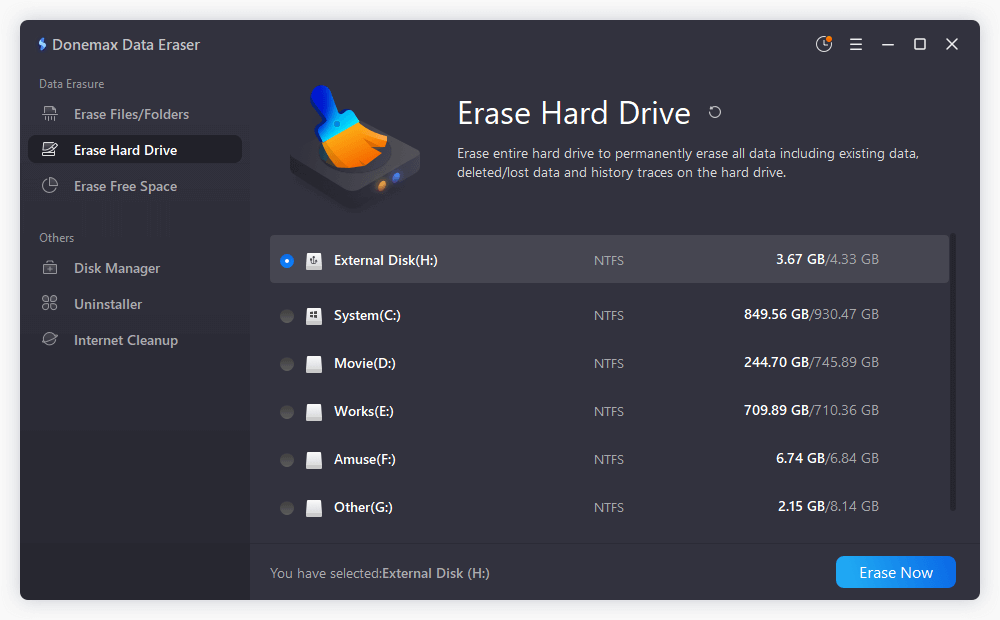
Step 1: Select 'Erase Hard Drive' Mode
Launch Donemax Data Eraser on your computer. In the main user interface, select the Erase Hard Drive mode from the left panel. This mode allows you to wipe an entire drive, partition, or external memory storage device. Locate and check the target memory card from the list of detected drives, then click the Erase Now button.
Step 2: Choose a Data Erasure Standard
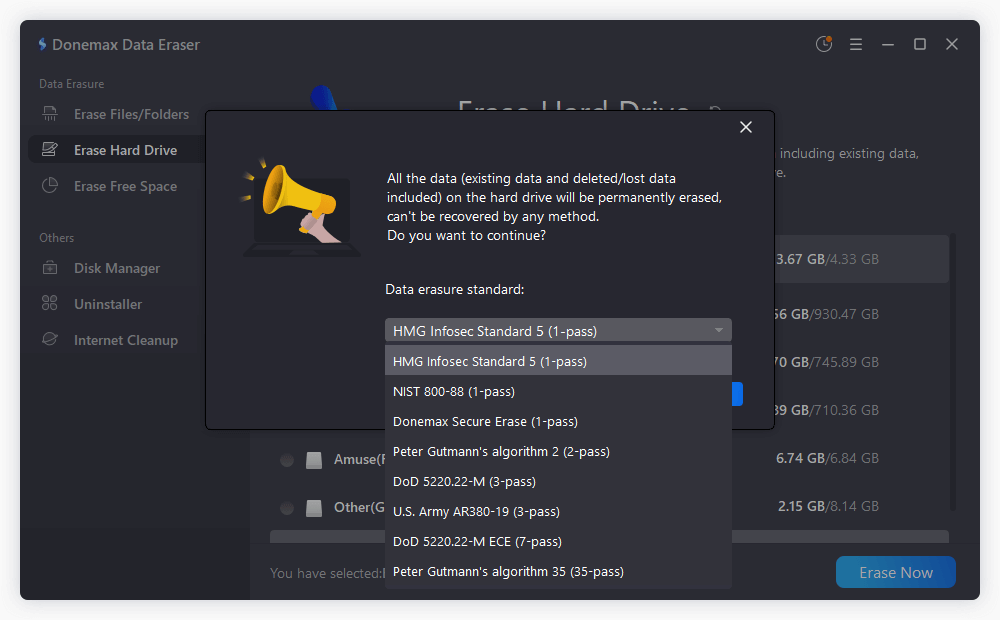
Donemax Data Eraser supports globally recognized data sanitization algorithms. Select the erasure standard that best fits your security needs. Options include HMG IS5 (1 pass), DoD 5220.22-M (3 passes), U.S. Army AR380-19 (3 passes), DoD 5220.22-M ECE (7 passes), and Peter Gutmann (35 passes). For standard consumer memory cards, a 1-pass or 3-pass erasure method provides absolute privacy protection.
Step 3: Start Permanent Data Wiping
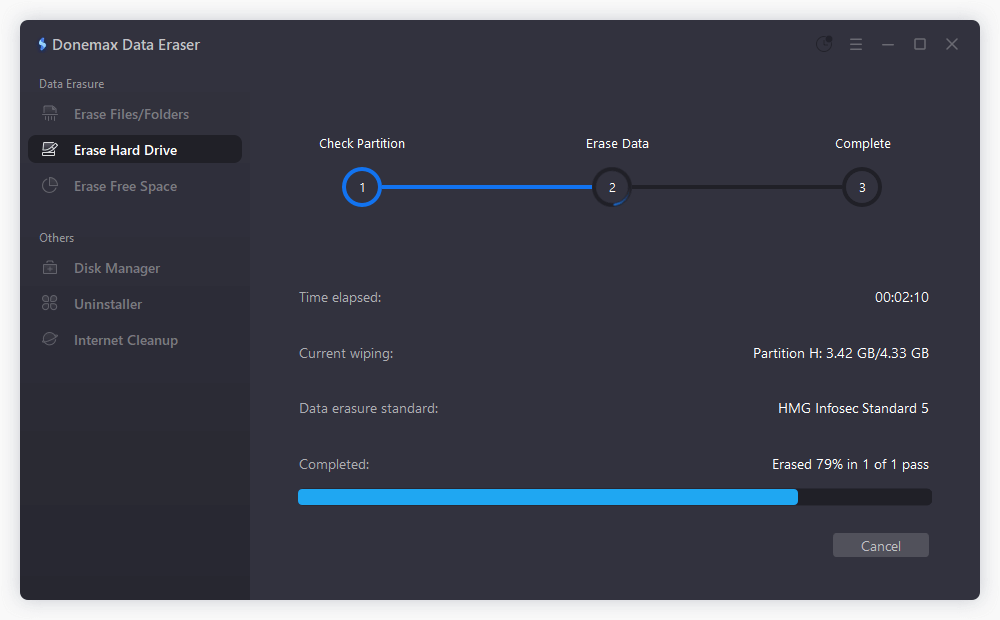
Click the Continue button to begin wiping the selected memory card. The software will systematically overwrite every sector on the card. Wait for the progress bar to complete. Once finished, all files, hidden metadata, and residual fragments are permanently erased.
Donemax Data Eraser includes several industry-standard sanitization protocols. Understanding these options helps you choose the right balance between security level and execution speed:
| Data Erasure Standard | Pass Count | Best Suited For |
|---|---|---|
| HMG IS5 Baseline | 1 Pass | Quick and reliable erasure for daily consumer memory cards before return or exchange. |
| DoD 5220.22-M | 3 Passes | U.S. Department of Defense protocol suitable for highly sensitive photos or corporate assets. |
| U.S. Army AR380-19 | 3 Passes | Military grade multi-pass wiping strategy providing enhanced sector overwriting. |
| Peter Gutmann Algorithm | 35 Passes | Maximum security method overwriting sectors 35 times for extreme privacy demands. |
To ensure your return process is completely smooth and safe, keep these practical checklist items in mind:
Protecting your personal photos and sensitive video files is just as important as returning your digital camera hardware in good physical condition. Simply deleting files or executing a camera format leaves your data open to recovery tools. By choosing to securely wipe digital camera memory card before return using Donemax Data Eraser, you can permanently sanitize your memory card with peace of mind.
Donemax Data Eraser
The best data erasure program to permanently delete data. It works on PCs, Macs, HDDs, SSDs, USB drives, digital cameras, and other devices. Once the tool erases the data, no one can recover it by any method.
Steven
Steven has been a senior writer & editor of Donemax software since 2020. He's a super nerd and can't imagine the life without a computer. Over 6 years of experience of writing technical solutions and software tesing, he is passionate about providing solutions and tips for Windows and Mac users.
Gerhard Chou
In order to effectively solve the problems for our customers, every article and troubleshooting solution published on our website has been strictly tested and practiced. Our editors love researching and using computers and testing software, and are willing to help computer users with their problems