
Written byStevenUpdated on Oct 27, 2026

Before we start: Simply deleting files and emptying the Recycle bin will not make the deleted files gone forever. If you want to permanently delete some sensitive files, use Donemax Data Eraser. The software can erase files with certified data wiping algorithms to make sure the files unrecoverable.
PAGE CONTENT:
Tax season comes with a mountain of confidential paperwork. From W-2 forms and 1099 statements to bank account ledgers and social security declarations, your tax files contain every critical detail of your financial identity. Once tax season wraps up or retention deadlines pass, keeping old PDF returns or Excel sheets on your PC is an open invitation to privacy risks. Identity theft, unauthorized file access, and malware infections can turn forgotten tax documents into a major headache.
Many computer users assume that dragging old tax records to the Windows Recycle Bin and emptying it is enough. However, standard deletion methods do not actually destroy your files. Anyone with data recovery software can retrieve your deleted tax documents in minutes.

If you want complete peace of mind, you need to learn how to erase sensitive tax documents permanently from PC using military-grade file destruction standards. In this article, we will show you why standard deletion falls short and how Donemax Data Eraser helps you wipe confidential tax files forever.
When you delete a tax document on Windows 11 or Windows 10, the operating system does not scrub the underlying data from your hard drive or SSD.
Instead, Windows simply removes the file pointer and marks that specific memory address as available space. Until new data happens to overwrite that exact sector, the original tax document remains completely intact beneath the surface.
Furthermore, tax software, web browsers, and PDF readers routinely generate hidden temporary files, cached copies, and backup records. Even if you erase the main PDF return from your desktop, secondary copies often remain stored in system folders.
Leaving these digital footprints behind puts your personal and business finances at risk. Achieving true privacy requires overwriting every trace of data with random binary code.
When you need a simple, safe, and powerful utility to destroy private financial files, Donemax Data Eraser is the recommended solution.
Engineered specifically for Windows 11, 10, 8, and 7, Donemax Data Eraser uses certified data destruction algorithms to ensure erased files can never be recovered by any software or data recovery specialist.
The software features a clean, user-friendly interface designed for users of all technical levels. You can permanently destroy individual tax forms, wipe entire folders, or clean out hidden temporary caches with just a few clicks.
Donemax Data Eraser provides three flexible modes to clean sensitive data from your computer:
1. Erase Files/Folders (Selective File Shredder)
If you only need to destroy specific tax files―such as last year's 1040 tax return or an Excel spreadsheet of business deductions―this mode acts like a high-security digital paper shredder.
Simply add or drag-and-drop the files into Donemax Data Eraser and click the erase button. The program targets those exact files, overwriting their sectors while keeping the rest of your system untouched.
2. Erase Hard Drive (Complete Drive Wipe)
If you are selling, donating, or recycling an old PC or external hard drive, erasing individual files is not enough. You need to wipe the entire drive.
This mode completely wipes all data, partitions, system files, and user records on the selected internal or external storage device, returning the drive to a factory-clean state.
3. Erase Free Space (Clean Previously Deleted Files)
What if you already deleted tax returns using standard Windows deletion in the past? Those files are still sitting in your drive's free space sectors.
The Erase Free Space mode scans and overwrites only the free space on your drive. It permanently wipes leftover traces of deleted files without affecting your active programs or current documents.
Bonus Tool: Web & System Privacy Cleaner
When you prepare taxes online or view tax PDFs in web browsers, sensitive records remain saved in browser history, download logs, and temporary Internet caches.
Donemax Data Eraser includes a built-in privacy cleaner that wipes browser history, cookies, download records, and system junk files to prevent accidental privacy leaks.
To ensure your sensitive files cannot be reconstructed by forensic recovery software, you must use certified file shredding algorithms.
Donemax Data Eraser replaces existing file content with zero-and-one binary patterns across multiple passes. Once overwritten, original data fragments vanish completely.
Common international standards used for secure tax data destruction include:
By choosing Donemax Data Eraser that implements these certified algorithms, you guarantee that your tax forms, pay stubs, and financial audits are destroyed beyond recognition.
Ready to clear your confidential tax records? Follow these simple steps using Donemax Data Eraser:
Step 1: Download and Install. Download Donemax Data Eraser and install the application on your PC.
Step 2: Choose 'Erase Files/Folders' Mode. Open Donemax Data Eraser. From the left sidebar menu, choose 'Erase Files/Folders' if you want to select specific tax forms.
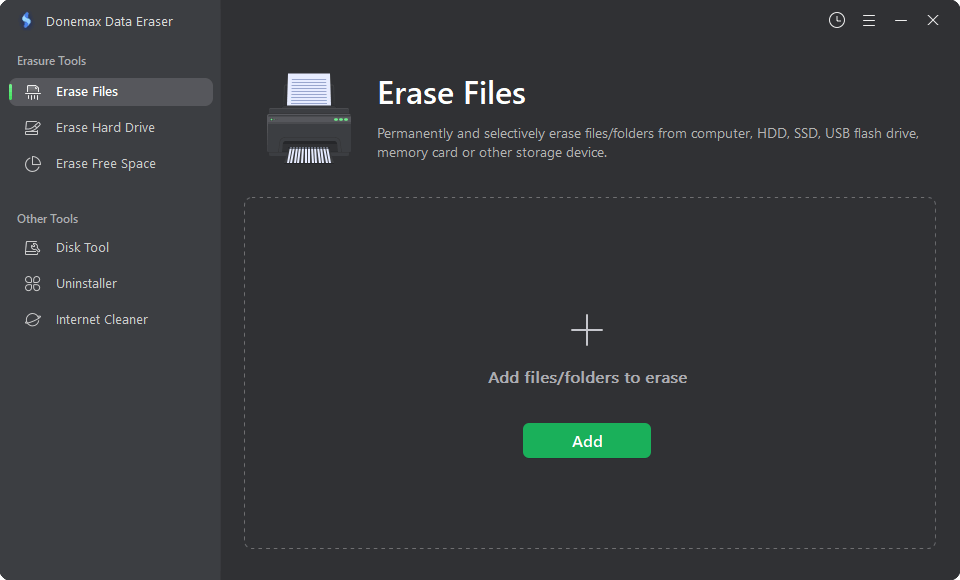
Step 3: Select Your Tax Files. Click the 'Add' button to browse your computer folders, or directly drag and drop your sensitive tax PDFs, Word docs, or spreadsheets into the software window.
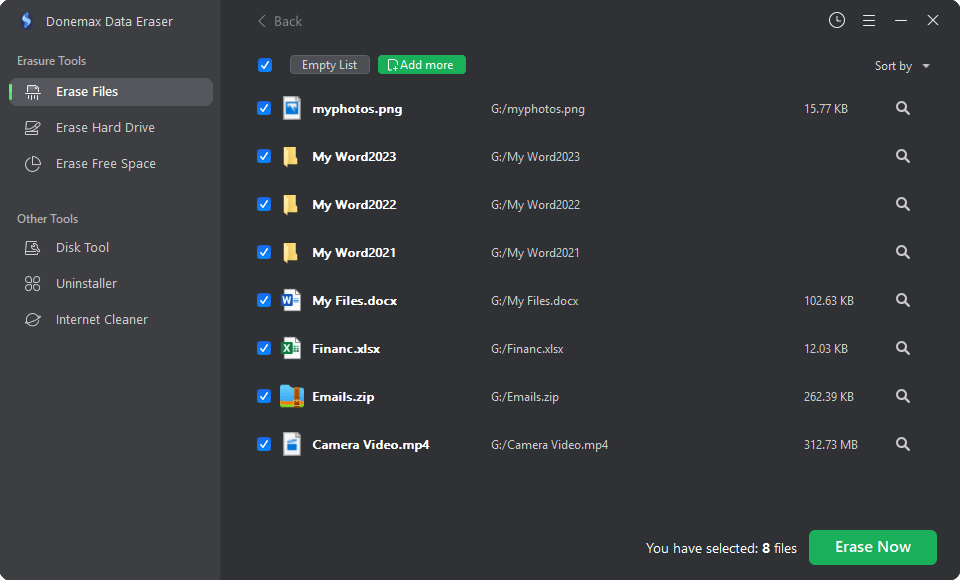
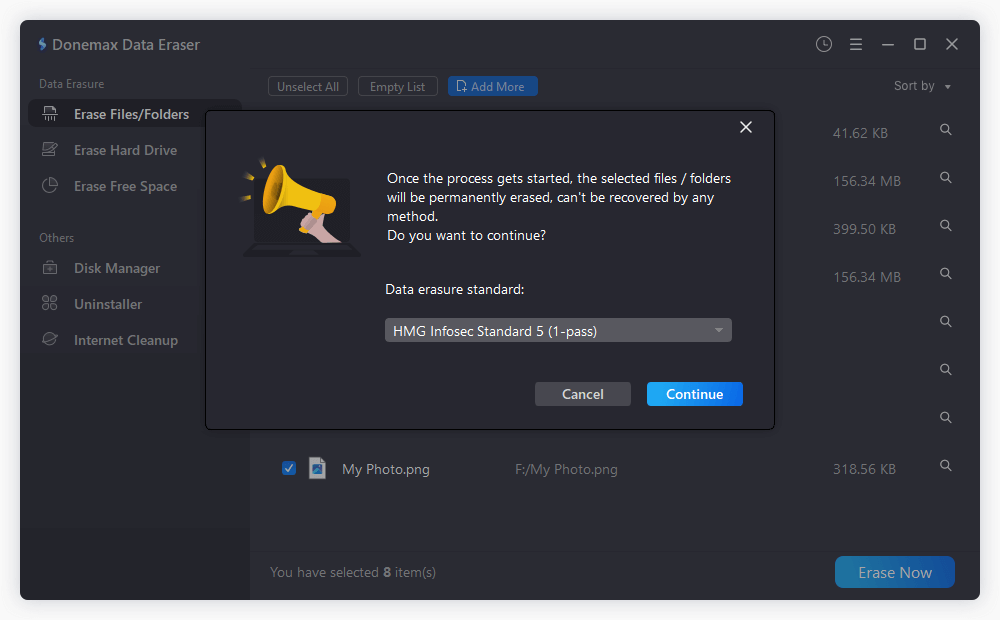
Step 4: Choose Data Eraser Standard. Click the 'Erase Now' button. A confirmation popup will appear to select a certified data wiping algorithm. Confirm your decision to begin the permanent destruction process.
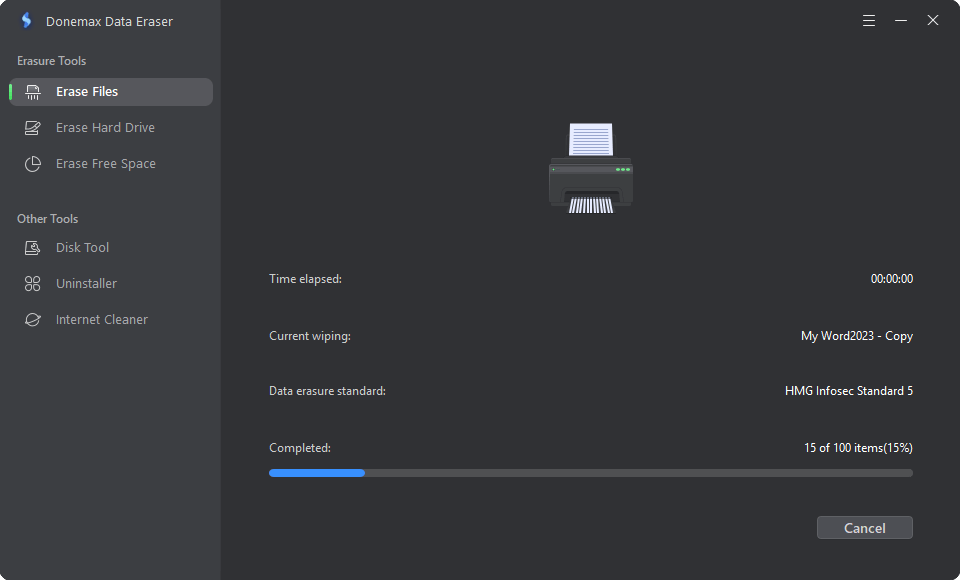
Step 5: Execute Permanent Erasure. The software will overwrite the selected files using certified algorithms. Once completed, a confirmation prompt will inform you that your tax documents are gone forever.
Protecting your financial identity starts with proper digital hygiene. Simply sending tax returns to the Recycle Bin leaves sensitive personal details exposed to data theft and forensic recovery.
By taking a few simple steps to erase sensitive tax documents permanently from PC using Donemax Data Eraser, you can ensure your W-2 forms, 1099s, and bank statements vanish without a trace. Download the professional data erasure software and secure your confidential financial information with ease.
Donemax Data Eraser
Donemax Data Eraser The best data erasure program to permanently delete data. It works on PCs, Macs, HDDs, SSDs, USB drives, digital cameras, and other devices. Once the tool erases the data, no one can recover it by any method.
Steven
Steven has been a senior writer & editor of Donemax software since 2020. He's a super nerd and can't imagine the life without a computer. Over 6 years of experience of writing technical solutions and software tesing, he is passionate about providing solutions and tips for Windows and Mac users.
Gerhard Chou
In order to effectively solve the problems for our customers, every article and troubleshooting solution published on our website has been strictly tested and practiced. Our editors love researching and using computers and testing software, and are willing to help computer users with their problems