
Written byStevenUpdated on Oct 09, 2026

Before we start: Every photo taken on a smartphone embeds hidden metadata including precise GPS coordinates. Cleaning Exif data before posting online prevents unwanted tracking and location leaks. Fortunately, Donemax Data Eraser can easily help you remove Exif data from photos to protect your privacy information safe.
PAGE CONTENT:
Taking photos with smartphones and digital cameras has become a natural part of daily life. Whether sharing holiday snapshots, posting on social media, or selling items on online marketplaces, sharing pictures online happens in seconds.
If you upload images without scrubbing this metadata, strangers can easily view your exact GPS location, home address, and device information. To protect your personal safety and digital privacy, learning how to remove Exif data from photos before sharing them online is essential.

Every picture you take contains a hidden digital footprint known as Exif data. This hidden metadata automatically records exact details about where, when, and how your image was captured. In this comprehensive guide, we will explain what Exif metadata contains, why removing it matters, and how to permanently strip Exif metadata using Donemax Data Eraser.
Exif stands for Exchangeable Image File Format. It is a standard feature built into modern smartphones, digital cameras, and tablets.
When you take a picture, your device automatically embeds technical and contextual information directly into the image file header.
While Exif metadata helps professional photographers organize photo collections, it presents serious security risks for everyday users.
Preventing Physical Tracking and Stalking
Posting photos taken at home, work, or your children's school leaks exact geographic coordinates. Malicious actors or stalkers can extract these GPS points to pinpoint your home address or daily routines.
Safe Online Marketplace Selling
When listing items for sale on websites like eBay, Craigslist, or Facebook Marketplace, uploaded photos can expose the exact location of expensive electronics, jewelry, or vehicles stored in your home.
Protecting Enterprise & Client Confidentiality
Businesses uploading product prototypes, office facility photos, or project documentation must strip metadata to avoid exposing confidential client details or internal server locations.
While some operating systems allow manual editing of basic properties, manual removal often leaves residual metadata intact or requires editing photos one by one.
Donemax Data Eraser provides a fast, secure, and professional solution with its dedicated Image Exif Erase feature.
Wiping sensitive metadata from your photo collection using Donemax Data Eraser requires only a few simple steps.
Step 1: Download & Launch Donemax Data Eraser
Download and install Donemax Data Eraser on your Windows PC or Mac. Open the application from your desktop.
Step 2: Add Photos or Folders
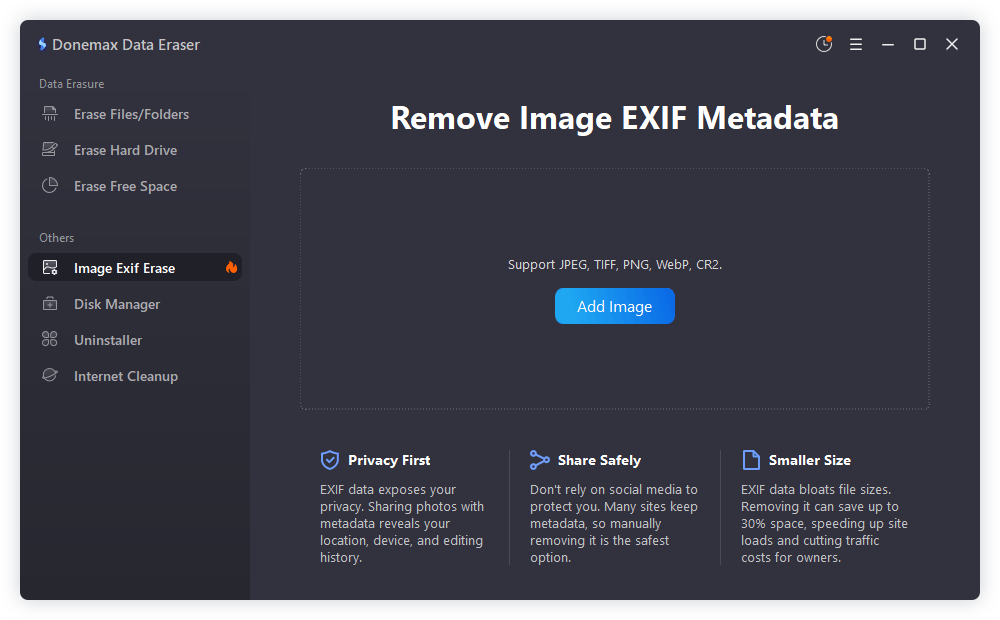
In the main sidebar menu, navigate to the privacy tools section and select 'Image Exif Erase'. Click the 'Add image' button or drag and drop your photos directly into the software window. You can select individual pictures or an entire folder of photos.
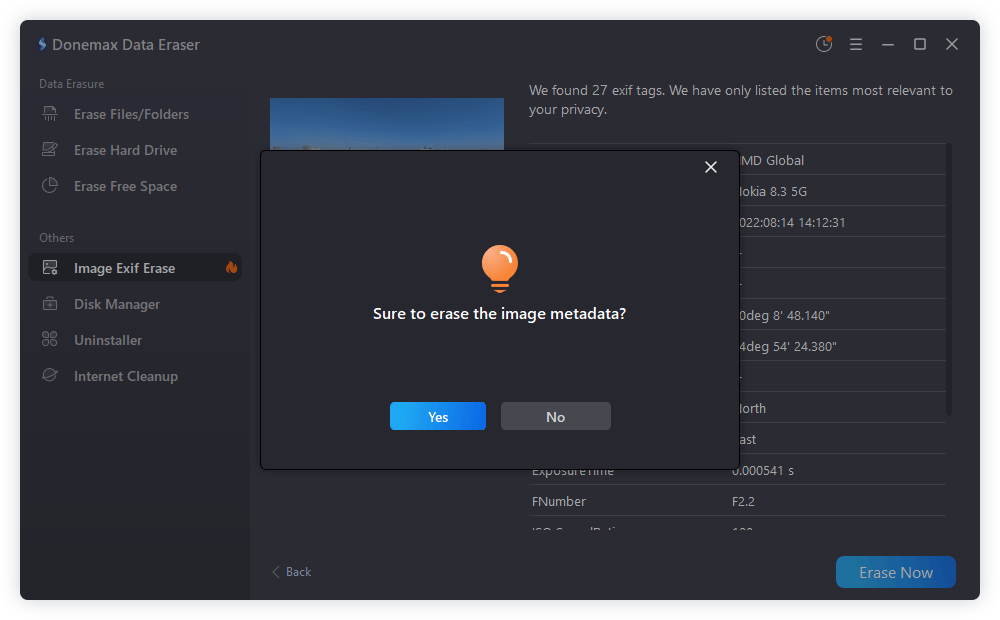
Step 3: Click 'Erase Now' to Strip Exif Metadata
Review your selected images, then click the 'Erase Now' button. Click 'Yes' button in the confirmation popup. Donemax Data Eraser will process all images, permanently scrubbing all hidden Exif metadata tags while leaving your image quality completely intact.
💡 Pro Tip: Batch processing an entire photo folder with Donemax Data Eraser ensures no forgotten image leaks location data when uploading photo albums to public platforms.
Understanding native OS metadata management options helps you decide which workflow fits your daily needs.
Removing Metadata in Windows 11 / 10
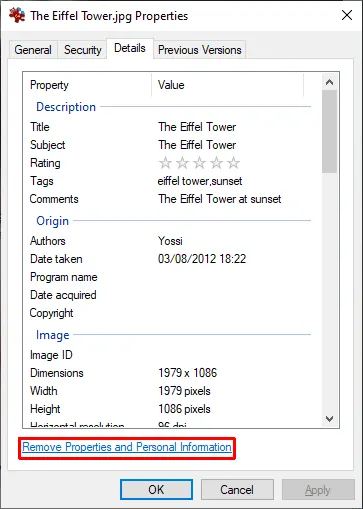
Right-click an image file, select Properties, and click the Details tab. Click 'Remove Properties and Personal Information' at the bottom. While simple, Windows built-in tools often fail to remove certain EXIF tags on non-JPEG files.
Removing Metadata in macOS Finder & Preview
Open an image in Preview, press Command + I, select the Inspector tab, and click the Location tab to remove location info. Alternatively, share images via AirDrop with location sharing toggled off.
Disabling Location Services on Smartphones
To prevent GPS tagging at the source on iPhone: go to Settings > Privacy & Security > Location Services > Camera, and select 'Never'. On Android: open Camera Settings and toggle off 'Location tags'.
Here is how different Exif removal methods compare in efficiency and privacy protection:
| Removal Method | Batch Processing | Removes All Metadata | Preserves Image Quality | Ease of Use |
|---|---|---|---|---|
| Donemax Data Eraser | Yes (Unlimited) | Yes (100% Clean) | Yes (Zero Loss) | Very Easy (1-Click) |
| Windows File Properties | Limited | Partial (JPEG only) | Yes | Moderate |
| macOS Preview Inspector | No (One by One) | Partial | Yes | Moderate |
| Smartphone Toggles | N/A (Future Photos) | Prevents GPS Only | Yes | Easy |
Sharing memories through photographs should not come at the expense of your personal privacy. Hidden Exif metadata exposes precise GPS locations, device details, and timestamps to anyone who downloads your images.
By taking control of your digital footprint and using Donemax Data Eraser's Image Exif Erase feature, you can quickly scrub sensitive metadata from individual photos or large collections. Protect your home address, safeguard your family, and share photos online with complete peace of mind.
Donemax Data Eraser
The best data erasure program to permanently delete data. It works on PCs, Macs, HDDs, SSDs, USB drives, digital cameras, and other devices. Once the tool erases the data, no one can recover it by any method.
Steven
Steven has been a senior writer & editor of Donemax software since 2020. He's a super nerd and can't imagine the life without a computer. Over 6 years of experience of writing technical solutions and software tesing, he is passionate about providing solutions and tips for Windows and Mac users.
Gerhard Chou
In order to effectively solve the problems for our customers, every article and troubleshooting solution published on our website has been strictly tested and practiced. Our editors love researching and using computers and testing software, and are willing to help computer users with their problems