
Written byChristinaUpdated on Nov 18, 2026

Summary: To make sure the data is gone forever without physically damage a drive, the most reliable solution is wiping the data with professional software. Donemax Data Eraser is the best choice for both personal and small businesses. It can permanently erase data with certified data wiping algorithms.
PAGE CONTENT:
Small businesses need certified data erasure solutions for small businesses that permanently remove sensitive information from retired computers, hard drives, SSDs, and USB devices. The best solution combines recognized erasure standards, device compatibility, verification, detailed reports, and a simple workflow that employees can use without specialist knowledge.
Certified data erasure solutions are tools or services designed to permanently remove information from storage devices and provide evidence that the erasure process was completed successfully.
A reliable solution should do more than delete files or format a drive. It should overwrite usable storage areas, handle hidden partitions where possible, verify the result, and generate a report that can be retained for internal audits, customer requests, or regulatory records.
The word "certified" can describe different things. A vendor may have certified software, an organization may follow a recognized data sanitization standard, or an employee may receive a certificate showing that a specific device was erased. Businesses should confirm exactly what the certification covers before purchasing a product.
For most small businesses, the practical goal is simple: make stored data unrecoverable, prove that the process worked, and complete the work at a reasonable cost.
Small businesses often handle customer records, employee data, payment information, contracts, passwords, and intellectual property. When an old device is sold, recycled, returned, or reassigned, deleted information may still be recoverable.
Deleting a file usually removes its reference from the file system. It does not necessarily overwrite the original data. A quick format may also leave much of the previous information intact. Specialized recovery software can sometimes reconstruct these files.
Verified erasure reduces this risk by replacing data with controlled patterns and checking whether the original content can still be accessed. A report then connects the result to a specific device, date, operator, and erasure method.
Common situations that require secure erasure include:
A small business does not need a large enterprise security department to create a defensible process. It needs a documented procedure, a suitable erasure tool, and consistent records.
Certification should be evaluated across several separate areas. A polished interface or a downloadable certificate alone does not prove that data has been securely removed.
| Area to evaluate | What to check | Why it matters |
|---|---|---|
| Erasure standard | Support for recognized sanitization guidance, such as NIST SP 800-88 | Provides a documented basis for the process |
| Device support | HDD, SSD, NVMe, USB, external drives, and other media | Prevents gaps when different devices are retired |
| Verification | Automatic or manual verification after erasure | Confirms that the intended process succeeded |
| Reporting | Device details, method, status, date, and operator | Creates evidence for audits and internal records |
| Certification scope | Whether the vendor, software, process, or individual device is certified | Prevents misleading compliance claims |
| Security controls | Read-only boot media, access restrictions, and secure report handling | Protects the process and its evidence |
NIST SP 800-88 is widely used as a reference for media sanitization. It describes three broad outcomes: clearing, purging, and destruction. The correct choice depends on the media type, data sensitivity, and future use of the device.
The safest purchasing decision is based on precise documentation. Ask the vendor what has been certified, which media types are covered, how verification works, and what information appears in the final report.
A single erasure method does not work equally well for every storage technology. Hard disk drives store data magnetically, while SSDs and NVMe drives use flash memory with wear leveling and over-provisioned areas.
For HDDs, a recognized overwrite process can usually address the user-accessible sectors. For SSDs and NVMe devices, repeated overwriting may be inefficient and may not reach every physical flash cell. A suitable sanitization command, secure erase function, or cryptographic erase method may be more appropriate.
Before erasing a drive, identify:
A professional erasure application should clearly identify the selected disk and provide warnings before destructive operations. For small businesses, this reduces the risk of erasing the wrong drive.
Donemax Data Eraser is designed for users who need to erase hard drives, SSDs, external disks, USB drives, and related storage media. Depending on the edition and configuration, it can support permanent data deletion, disk wiping, partition wiping, and bootable erasure workflows.
Its value for a small business is mainly operational simplicity. A business can use a bootable environment to erase a computer before the operating system starts, which is useful when the existing system is unreliable or contains multiple user accounts.
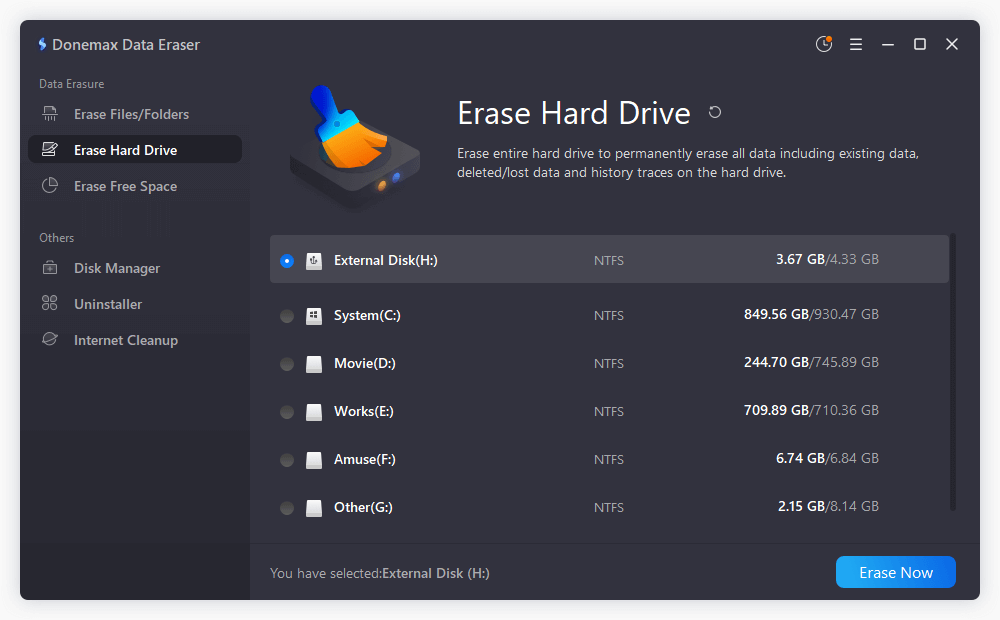
A typical workflow is:
Donemax or any other software should not be described as universally certified unless the vendor provides specific, current documentation identifying the certification and its scope. Businesses that require formal regulatory evidence should review the product’s reports, supported standards, and independent validation before adopting it.
Software is only one part of secure disposal. A written policy ensures that the same process is followed when staff members change or devices move between locations.
A small-business policy should define:
Keep reports separate from sensitive user data whenever possible. An erasure report should prove what happened without containing the information that was removed.
A simple asset register can include the asset number, device serial number, storage type, assigned user, erasure date, method, operator, result, and final destination. This record creates a clear chain of custody from retirement to reuse, resale, recycling, or destruction.
The most common mistake is treating deletion or formatting as permanent erasure. These actions are convenient, but they may not remove the underlying data.
Another mistake is using the same process for HDDs and SSDs without considering how each technology stores information. Businesses should follow the tool’s media-specific guidance and retain evidence of the selected method.
A third mistake is saving reports without linking them to physical devices. A report that does not include a serial number, asset identifier, or other unique reference is difficult to defend during an audit.
Finally, businesses should not rely on the word "certified" without checking its meaning. Certification claims should identify the certifying organization, applicable standard, certification date, covered product or process, and any limitations.
The best certified data erasure solutions for small businesses combine recognized sanitization guidance, support for modern storage devices, verification, and auditable reporting. Choose a tool that matches your media types and disposal volume, create a repeatable policy, and confirm exactly what the vendor’s certification claims mean before processing sensitive business data.
Donemax Data Eraser
Donemax Data Eraser The best data erasure program to permanently delete data. It works on PCs, Macs, HDDs, SSDs, USB drives, digital cameras, and other devices. Once the tool erases the data, no one can recover it by any method.
Christina
Christina is the senior editor of Donemax software who has worked in the company for 4+ years. She mainly writes the guides and solutions about data erasure, data transferring, data recovery and disk cloning to help users get the most out of their Windows and Mac. She likes to travel, enjoy country music and play games in her spare time.
Gerhard Chou
In order to effectively solve the problems for our customers, every article and troubleshooting solution published on our website has been strictly tested and practiced. Our editors love researching and using computers and testing software, and are willing to help computer users with their problems